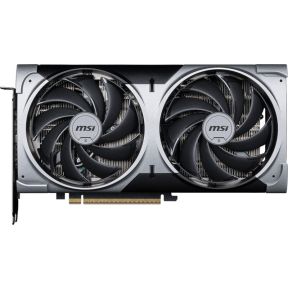
Search for a graphics card and you will meet a strange thing: ten cards that all say "RTX 5070" (or the AMD equivalent), at ten slightly different prices. The chip inside is the same. The memory is the same. So what are you paying the extra for?
One chip, many cards
Nvidia and AMD design the graphics chip. Other companies, called board partners, buy that chip and build the card around it: the circuit board, the power parts, the cooler, the fans and the plastic shroud. That is why two cards with the same name can look nothing alike.
The chip decides almost all of your frame rate. The card around it decides four smaller things: how big it is, how hot it runs, how loud the fans get, and how much the clock speed is nudged up at the factory.
What "OC" on the box means
A card marked OC (overclocked) ships with a slightly higher boost clock than the reference design. For an RTX 5070 the reference boost clock is about 2,510 MHz. Some cards listed as OC run 2,542 MHz, and a larger, more expensive one runs 2,610 MHz. Those are real numbers from the makers' spec pages, and they sound big until you do the sum: 2,542 is about 1% above the reference, and 2,610 is about 4% above it.
In a game, the gain is usually smaller than the clock gain, because the memory speed stays the same. Think of it as going from 100 frames per second to 101 or 104 at best. You would never notice that without a counter on screen.
Where the money really goes: the cooler
A bigger cooler has more metal and bigger fans. Bigger fans can move the same air while spinning slower, and slower fans are quieter. A big cooler also lets the chip hold its top clock for longer before it has to slow down to stay cool. A small two-fan card works fine on this chip, but its fans will usually spin faster and sound sharper under load.
The trade-off is size. The large three-fan cards can be well over 300 mm long and more than two slots thick. Many cases cannot take them, and a few small cases cannot take even a normal-length card. This is the mistake beginners make most often, so try it below.
Reading a spec page before you buy
Every card page lists a few lines worth reading. Length in millimetres is the one that can stop a build. Compare it with your case's "maximum GPU length", and leave a little spare room for cables at the front. Thickness or slot width matters too: a thick card can cover the next PCIe slot or touch the side panel. Boost clock tells you the factory overclock, but treat it as a small bonus. Power connectors must match what your power supply has, and the card page also lists a recommended power supply size.
Fan count is the other visible difference, and the page also lists the warranty, which is worth a glance.
What to look for
On a tight budget, a compact two-fan card with the right chip and enough memory is the sensible choice. Check its length against your case first, and ignore the OC label.
In the middle, look for a short three-fan card if your case is small, or a standard one if it is not. The extra fan usually means quieter running at the same speed.
At the top, a big triple-fan card buys you cooler running, quieter fans and a few percent of clock speed. Pay for it only if the case has room and you care about noise, not because you expect a different frame rate.