How does a 2D character walk? Sprite sheets and animation speed
Every 2D game character walks the same way a flipbook does: a few drawings shown one after another. Games pack those drawings into a single sprite sheet and slide a small window along it.
Play with the speed, pick single frames, and learn why animation speed is not the same as your game's frame rate.
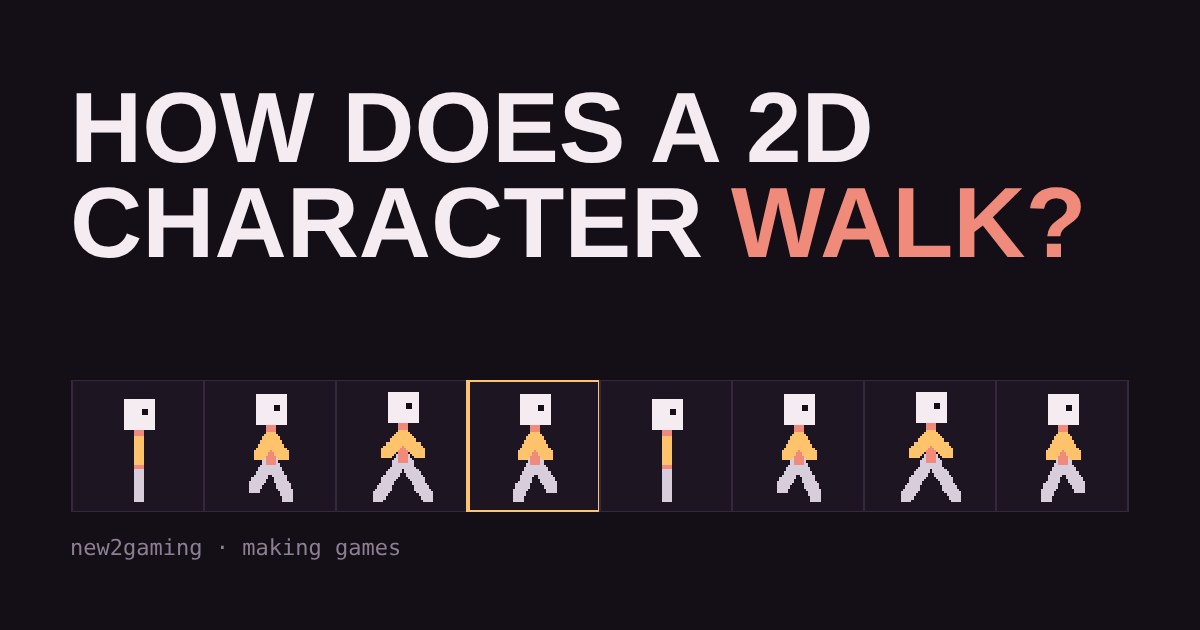
One picture, many poses
When a character in a game walks, no one is moving a skeleton around. In most 2D games the walk is a flipbook: a handful of drawings, each showing one pose, shown one after another so quickly that your brain sees movement. Each drawing is called a frame.
Games rarely store those frames as separate files. They pack them side by side into one image called a sprite sheet. The game then cuts out a small window of that image, a few dozen pixels wide, and slides the window along the strip. Slide it to the next pose, and the character takes a step.
Why the frame rate of the animation is separate from your game's frame rate
Your game might draw 60 or 144 times a second. The walk animation does not need to change that often. Hand-drawn game animation commonly changes pose around 8 to 12 times per second, and that is plenty for the eye to read it as motion. Drawing a new pose every screen update would need many more frames and the walk would look like a blur.
So a game keeps two things apart: how often the screen is redrawn, and how often the animation moves to its next frame. In the demo above, the slider only changes the second one.
Good games also count in real time, not in screen updates. If a game says "advance one frame every 0.1 seconds" and tracks the clock, the walk looks the same speed on a fast PC and a slow phone. If it says "advance every 6 updates", the walk would run faster or slower depending on the machine.
Why pack frames into a sheet?
You could keep 8 separate image files for one walk, and a game with many characters, each with walking, jumping, attacking and idling, would end up with thousands. Loading that many tiny files is slower and messier than loading one image, and graphics hardware generally prefers to switch between fewer, larger images. Packing the frames into a sheet (often called a texture atlas when it holds many different things) keeps everything in one place.
The cost of a sheet is that every frame must be the same size, or the game needs a small data file that says where each frame sits. Many beginner tools and engines read that data file for you.
What makes a walk look right
A walk cycle is a loop: the last frame must lead smoothly back into the first. Look at the sheet above. The character's body rises and falls twice per cycle, and the arms and legs swing in opposite directions. If the end pose did not match the start pose, you would see a small hitch every time the loop restarted.
Three habits help beginners:
- Start with the extreme poses (legs furthest apart, legs crossing) and fill in between them.
- Keep every frame the same size and put the character's feet on the same line.
- Test the loop at the speed it will really play, not by flicking through frames by hand.
Keep pixel art sharp
Small sprites are usually drawn tiny and scaled up on screen. If the game smooths the enlarged image, the crisp edges turn blurry. Most engines have a setting for this, often called "nearest" or "point" filtering, and turning it on keeps pixel art sharp. The demo above uses it: the character is only 64 pixels wide on the sheet and is shown larger.
What to try first
Draw a four-frame animation, even a bouncing ball, in any free pixel editor. Export it as one horizontal strip, load it in your engine of choice, and play it at 8 frames per second. Then change the speed and see how the character's personality shifts. Once that works, add a second animation, such as standing still, and switch between the two when the player presses a key. That is the core of how nearly every 2D character comes to life.
More in Making Games
all Making Games →18 Oct Why does a game run faster on a faster PC? Game loop and delta time explained Ever noticed a game run faster on a quicker computer? That's the game loop at work. If you move things a fixed amount every frame, a faster… Making Games
16 Oct What is game juice? Screen shake, hit-stop and why hits feel good Two games can have identical rules and still feel completely different. The difference is often juice: small effects like screen shake… Making Games
14 Oct How are 2D game levels built? Tilemaps explained Most 2D game levels are not big pictures. They are a grid of numbers that points at a small set of repeating tiles. That is called a… Making Games
12 Oct How does a game camera follow you? Smoothing, dead zones and look-ahead Every game has a camera, and how it follows you changes how the game feels. Learn the four common types: locked, smooth, dead zone and… Making Games
10 Oct How does a game remember your progress? Save files explained How does a game remember where you stopped? It writes a small file of facts, called the game state, and reads it back when you load. Try a… Making Games
5 Oct How does a game enemy decide what to do? State machines for beginners Ever wondered how a game guard knows when to chase you? Most enemies run on a state machine: they are always in exactly one state, like…