How are 2D game levels built? Tilemaps explained
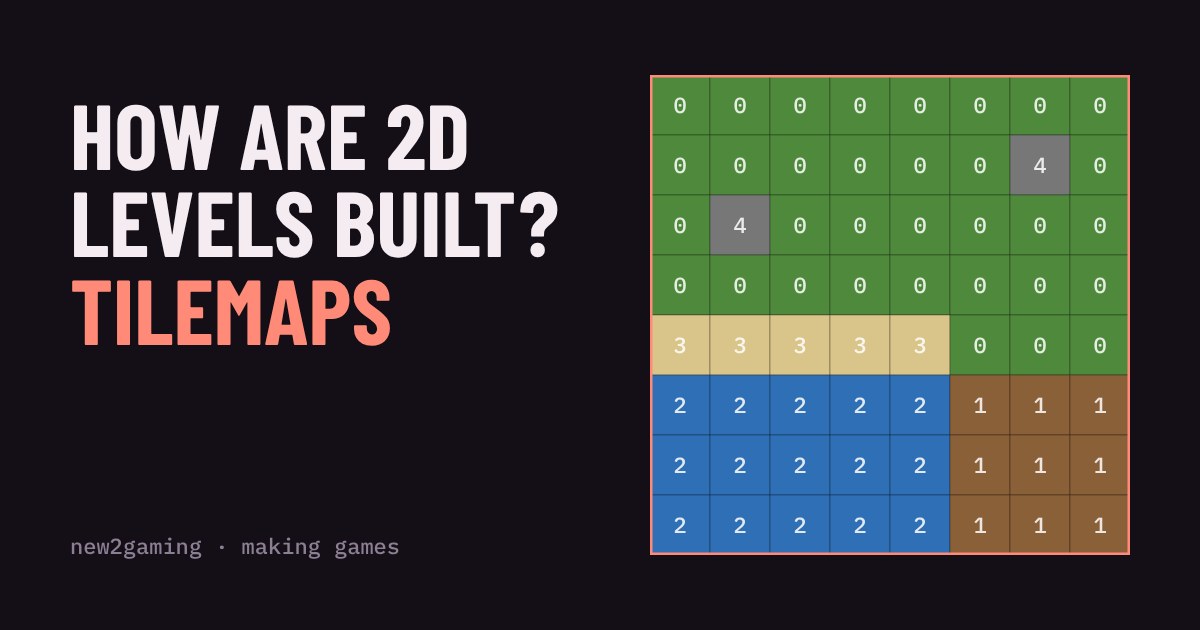
Most 2D game levels are not big pictures. They are a grid of numbers that points at a small set of repeating tiles. That is called a tilemap.
Paint your own level, watch the numbers change, and see why tilemaps keep files tiny, make levels quick to build and make game rules easy to add.
Open almost any 2D game and look at the ground. Grass, brick, water, sand. Look closely and you will spot the same little picture repeated again and again, like bathroom tiles. That is not laziness. It is one of the oldest and smartest tricks in game making, and it is called a tilemap.
A level is a grid of numbers
A tile is a small square picture, often 16 by 16 pixels. A tileset is the collection of tiles a game can use: one for grass, one for dirt, one for water and so on. The tilemap is the level itself, and here is the surprise: it does not contain any pictures. It is just a grid of numbers. Say 1 means grass, 2 means dirt and 3 means water. A row of the level might be stored as 1 1 1 2 2 3 3.
When the game draws the screen, it walks through the grid, looks up each number in the tileset and stamps the matching picture in the right place. The numbers say what goes where. The tileset says what each thing looks like.
Paint a level yourself
Pick a tile below and paint on the grid. Watch the numbers underneath: that grid of numbers is everything the game would need to save for your level.
Why bother? Three big wins
Small files. The counter above shows the gap. Storing one number per cell takes a tiny fraction of the space needed to store a picture per cell. A level of thousands of cells is a few kilobytes. The tileset is drawn once and reused everywhere, which also keeps the game light on memory and fast to draw.
Fast level building. Making a level means painting, not drawing. Want a lake? Pick water and drag. Want to change every wall from brick to stone? Swap one picture in the tileset and the whole level updates, because the map only says "tile 4", not what tile 4 looks like.
Easy rules. Because the world is a grid, the game can attach rules to tile numbers. Water slows you down, stone blocks you, sand is fine to walk on. To check whether you can step right, the game just looks at the number in the next cell. No complicated shape maths needed. Many engines let you mark each tile as solid or not once, in the tileset, and then every use of that tile follows the rule.
Layers and tricks
Real games usually stack several tilemaps. A ground layer holds grass and paths, a decoration layer holds flowers and rocks, and a front layer draws over the player, like the tops of trees you can walk behind. Each layer is its own grid of numbers, so you can change one without touching the others.
Tilesets are often combined into one big image called a sprite sheet or atlas, because drawing from one image is quicker than juggling many. And some engines can auto-tile: you paint "grass" and the engine picks the right edge and corner pictures for you, so borders look neat without hand-placing each one.
Try it in your own game
You do not need to code a tilemap from scratch. Popular engines such as Godot and Unity include tilemap tools, and there are free standalone editors such as Tiled that save levels as data files engines can load. A good first project is one screen with four tiles: ground, wall, water and a goal. Keep the tiles small and the grid simple, and you will have a playable level in an afternoon.
Next time you play a 2D game, look for the repeating squares. Once you see the grid, you will notice it everywhere, from tiny puzzle games to huge worlds.
More in Making Games
all Making Games →18 Oct Why does a game run faster on a faster PC? Game loop and delta time explained Ever noticed a game run faster on a quicker computer? That's the game loop at work. If you move things a fixed amount every frame, a faster… Making Games
16 Oct What is game juice? Screen shake, hit-stop and why hits feel good Two games can have identical rules and still feel completely different. The difference is often juice: small effects like screen shake… Making Games
12 Oct How does a game camera follow you? Smoothing, dead zones and look-ahead Every game has a camera, and how it follows you changes how the game feels. Learn the four common types: locked, smooth, dead zone and… Making Games
10 Oct How does a game remember your progress? Save files explained How does a game remember where you stopped? It writes a small file of facts, called the game state, and reads it back when you load. Try a… Making Games
7 Oct How does a 2D character walk? Sprite sheets and animation speed Every 2D game character walks the same way a flipbook does: a few drawings shown one after another. Games pack those drawings into a single… Making Games
5 Oct How does a game enemy decide what to do? State machines for beginners Ever wondered how a game guard knows when to chase you? Most enemies run on a state machine: they are always in exactly one state, like…