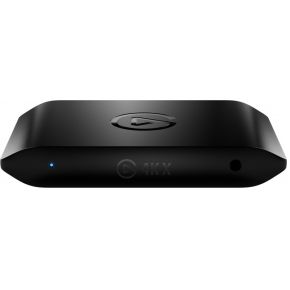
Press the share button on a PS5, Xbox or Switch and you can save a screenshot or a short clip without buying anything. So why do people sell little boxes called capture cards? Because they solve a different problem: getting your game onto a PC, where you can record long sessions, edit, or go live. This guide explains what a capture card does, who needs one, and which numbers to check.
What a capture card actually does
A capture card sits between your console and your TV. The console sends its picture over an HDMI cable into the card. The card does two jobs at once. It copies the picture to your computer over USB, and it sends the same picture on to your screen. That second job is called passthrough.
Good passthrough is "lag-free": the picture reaches your screen without noticeable delay, so playing feels the same as with no card. Your PC gets a copy that may be a few moments behind, which does not matter for recording. It matters only if you watch the PC preview while playing, so play on the TV or monitor instead.
Do you need one?
Often not. Built-in capture is enough for screenshots and short clips you post straight from the console. A card starts to make sense when you want one or more of these:
Long recordings. Whole matches or full playthroughs, saved on your PC's drive instead of the console's storage.
Live streaming with a webcam, a microphone and overlays in streaming software.
Editing. Clean footage on a computer you can cut and export from.
A card also costs money, needs a PC or laptop, and adds one more cable to your setup. If you only share the occasional clip, skip it.
The numbers that matter
Passthrough resolution and refresh rate. This is what reaches your screen. If your console outputs 4K at 120 Hz but the card passes only 4K at 60 Hz, the console has to drop to a lower mode, and you lose the smooth picture you paid for. Cards that advertise HDMI 2.1 passthrough are the ones built for 4K at 120 Hz.
Capture resolution and frame rate. This is what lands in your recording. Many cards pass a 4K picture through but record at 1080p. That is fine for most streams and videos, and the files are much smaller.
The USB connection. A fast recording needs a fast cable and port. Cards that record high resolutions or frame rates ask for a USB 3 port or faster, and a slow or shared port can cause dropped frames.
HDR and VRR. HDR (richer brightness and colour) and VRR (a refresh rate that follows the game) are passed through by some cards. HDR recording is more limited, so check which resolutions and which computers a maker supports before counting on it.
Copy protection. Streaming apps and some video content are protected, so a capture shows a black screen. Capture cards are for your own gameplay.
Your computer does the heavy work
The card only moves the picture. Your PC runs the recording or streaming software and, if you stream, encodes the video live. A modest laptop can handle 1080p. Recording 4K or streaming while also playing a demanding game on the same PC is a bigger job, but console players have a head start: the console runs the game, so the PC only has to record.
What to look for
Starting out (around €20–100): a card that records 1080p at 60 frames per second and passes through the mode your console uses. Budget cards from unknown makers vary a lot, so prefer one with clear specs and a USB 3 connection.
The sweet spot (around €150–200): a well-known maker, software support, and passthrough that matches your TV or monitor.
Step up (around €200+): HDMI 2.1 passthrough for 4K at 120 Hz and VRR, if your screen and console use them. If you play at 1080p or 4K at 60 Hz, you do not need to pay for it.