Why does a game stutter when the FPS looks fine? Frame time and 1% lows explained
Your game says 60 FPS but feels choppy. That is not in your head: FPS is an average, and it hides how evenly the frames arrive.
Learn what frame time is, why one slow frame feels like a freeze, and what 1% lows tell you. Drag the slider to see two games with the same average FPS feel completely different, then get a short checklist for finding the cause of stutter.
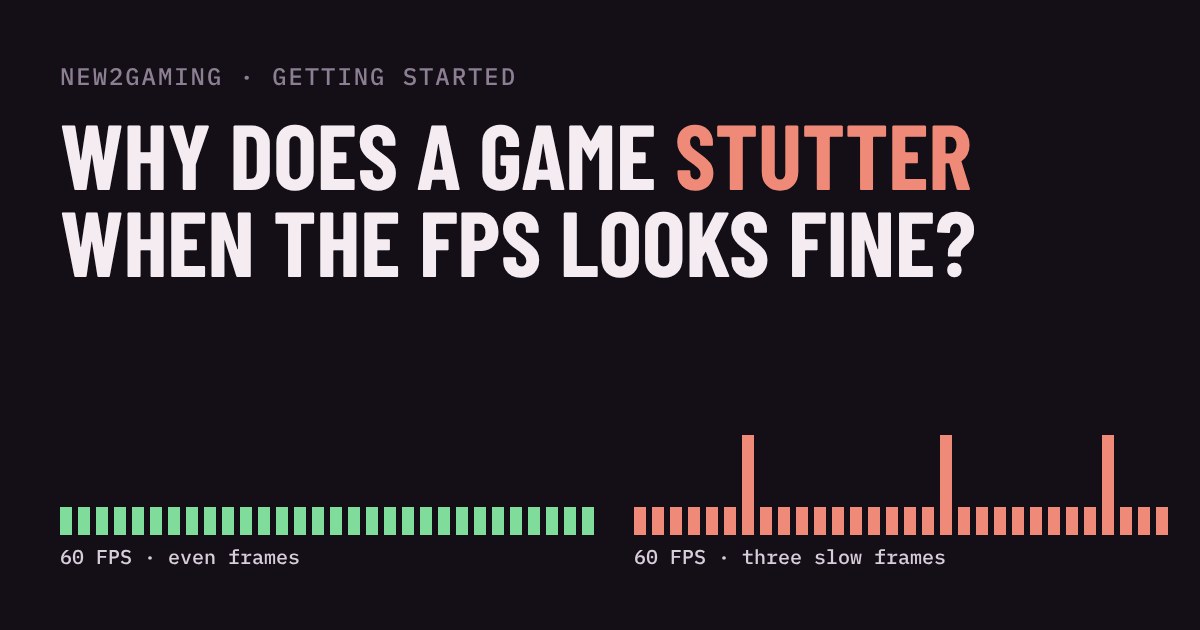
FPS is an average, and averages hide things
Your game says 60 FPS, yet it feels choppy. That is not your imagination. FPS (frames per second) counts how many pictures your PC drew in the last second. It says nothing about when in that second they arrived. Sixty frames can show up like a metronome, or they can bunch together and then leave a gap. Both add up to 60.
The gap is what you feel. Your eyes follow a moving object and expect it to shift a little each frame. When one frame takes far too long, the object freezes and then jumps. That jump is stutter.
Frame time: how long each picture takes
Frame time is the number of milliseconds (ms) between one frame and the next. It is the same information as FPS, turned upside down: divide 1000 by the FPS. A smooth 60 FPS means a new frame every 16.7 ms, again and again.
| Frame rate | Time per frame |
|---|---|
| 30 FPS | 33.3 ms |
| 60 FPS | 16.7 ms |
| 120 FPS | 8.3 ms |
| 144 FPS | 6.9 ms |
Frame time shows what an FPS counter smooths away. If most frames take 14 ms and one takes 80 ms, the counter still reads a healthy number, but you saw a freeze nearly five frames long.
Try it: the same FPS, a very different feel
Both lanes below average the same frame rate. The top lane delivers frames evenly. In the bottom lane, drag the slider to add occasional slow frames. The dot in each lane moves at the same speed, and it only updates when a new frame arrives, just like a game does. Watch the bottom dot hitch while the average number barely moves.
What 1% lows tell you
Many reviewers and overlay tools report 1% lows next to the average. The idea is to take the slowest 1% of frames and convert them into an FPS number. If the average is 60 but the 1% low is 25, those worst moments felt like 25 FPS. A small gap between the two numbers means steady pacing. A large gap means stutter, even when the average looks fine.
Tools calculate this slightly differently, so only compare 1% lows measured the same way. Use them as a warning light, not a precise score.
What causes stutter
Stutter happens when something makes a single frame wait. The common culprits:
Running out of VRAM. When the graphics card's memory is full, data has to be swapped in from slower memory, and frames stall. Lower texture quality is the usual fix.
Slow loading from storage. Open-world games stream the world in as you move. Installing on an SSD instead of a hard drive helps a lot.
Shader compilation. Some games prepare graphics code the first time an effect appears, which can freeze a frame. It often calms down after the first play session.
Background programs and heat. A browser, an update, or a hot, throttling processor can steal time from the game at random moments.
What to look for
You do not need to buy anything to start. Try these in order: close background programs, make sure the game is on an SSD, update your graphics driver, then lower texture quality if your VRAM is nearly full. Capping your FPS slightly below what your PC can hold steadily also keeps frame times even, because the game stops swinging between fast and slow.
Then judge smoothness by feel and by frame time, not by the FPS number alone. If a game says 60 and feels like 40, trust your eyes and look at the worst frames, not the average.
More in Getting Started
all Getting Started →23 Oct What is V-Sync? Screen tearing, G-Sync and FreeSync explained Why does your game screen sometimes show a torn line, and what do V-Sync, G-Sync and FreeSync do about it? This guide explains how your… Getting Started
20 Oct What is HDR in games? Nits, DisplayHDR and when to turn it on HDR promises brighter highlights and deeper shadows, but only if your screen, your system and your game agree. This guide explains what HDR… Getting Started
18 Oct Fullscreen, borderless or windowed? Which display mode to pick Every PC game asks you to choose Fullscreen, Borderless or Windowed. They all show the game, but they behave differently when you alt-tab… Getting Started
16 Oct Which graphics settings cost the most FPS? Shadows, ray tracing and textures explained Graphics presets like Low, High and Ultra hide a useful fact: settings do not cost the same. A few of them, such as ray tracing, shadows… Getting Started
14 Oct What is mouse sensitivity? DPI, eDPI and cm/360 explained Your mouse has a DPI, your game has a sensitivity, and players quote something called eDPI. It sounds like three settings, but they all… Getting Started
12 Oct What is field of view (FOV)? Why a wider view helps and when it hurts Field of view (FOV) is how much of the game world fits on your screen. Too narrow feels like a tunnel; too wide stretches the edges and can…